

localhost on your laptop, VM, or container.
This guide shows you how to give an MCP server a public HTTPS URL with ngrok, lock it down so only your AI client can call it, and connect it to each major MCP client.
To let your AI agent manage your ngrok account instead, see the ngrok MCP server.
The URL is stable on every ngrok plan, including free, so you configure each client once.
Claude Code and Cursor run on your machine, so they can already reach a server on the same machine at localhost.
Use ngrok with them when the server runs on another machine, or to test the same URL and authentication a remote client uses.
Example scenario
You’re building an MCP server that wraps your team’s internal ticketing API. It runs on your laptop on port3001 and serves MCP at /mcp.
Before you deploy it anywhere, you want to try it from ChatGPT, Claude, Grok, and Cursor, and you don’t want anyone else on the internet calling its tools.
You need three things:
- A public HTTPS URL that forwards to
localhost:3001. - Authentication in front of that URL, so only your AI client gets through.
- A way to see exactly what each client sends when something doesn’t work.
Architectural reference
The ngrok agent opens an outbound connection from your machine to ngrok’s cloud. You don’t open any inbound ports, change your firewall, or deploy anything. Traffic Policy runs in ngrok’s cloud, so requests that fail your rules never reach your machine.Which MCP transports work?
Which authentication fits your client?
Claude Code and Cursor let you set custom headers on an MCP server, so they can send a bearer token. ChatGPT and Claude.ai connectors take a URL and support OAuth, but don’t let you add a header. For those, use a secret path while you test, and OAuth when real users rely on the server.Tutorial
What you’ll need
- An ngrok account. If you don’t have one, sign up.
- The ngrok agent installed on the machine that runs your MCP server.
- An MCP server that serves Streamable HTTP or HTTP + SSE.
This guide uses port
3001and the path/mcp.
Check that your MCP server responds
Send an MCP A JSON-RPC response means the server is up.
Many MCP servers return
initialize request to your server:404 or 405 for a plain GET /, so don’t test in a browser.Create a Traffic Policy that requires a token
Anyone with your URL can call your server, and MCP tools can act on your machine.
Protect it before it goes online.This step uses a bearer token, which works for clients that can send a header.
If your client only takes a URL, use the policy in Use a secret path instead, then continue with step 3.Generate a long random token:Save this as This rule rejects any request without the right bearer token.On a paid plan, also limit how often each client can call your server with the rate-limit action.
Add this rule after the first one:
policy.yml, replacing YOUR_TOKEN with the value you generated:Put your MCP server online
https://your-assigned-name.ngrok-free.dev.
This is your account’s dev domain.
It stays the same every time you restart ngrok http, so your client configs keep working.Your MCP URL is the public URL plus your server’s path:Connect your AI client
- Claude Code
- Cursor
- ChatGPT
- Claude.ai
- Grok
Ask your AI client which tools it can see. The request appears in the ngrok inspector at localhost:4040.
Watch the traffic
Open
http://localhost:4040 while your client connects.
The ngrok inspector shows every request your client sends and every response your server returns, including JSON-RPC bodies.
When a client says it can’t list tools, start here: you see whether the request arrived, what it contained, and what your server sent back.Secure clients that only take a URL
Some connector settings only accept a URL. Use one of these instead of a bearer token.Use a secret path
Serve your MCP endpoint under a long random secret, such as/s/YOUR_SECRET/mcp, by changing the path in your server’s configuration.
Then reject every other path at ngrok, so guesses never reach your machine:
https://your-assigned-name.ngrok-free.dev/s/YOUR_SECRET/mcp.
On a paid plan, you can leave your server on /mcp and strip the secret at ngrok with the url-rewrite action.
Add this rule after the deny rule:
Allow only the AI provider’s network
ngrok maintains IP categories for major services, including Anthropic and OpenAI. This rule admits only Anthropic’s API servers:Use OAuth for real users and real data
Implement OAuth in your MCP server according to the MCP authorization spec. Clients that support it run the sign-in flow when your server asks for it. ngrok forwards the OAuth discovery and token requests like any other request. If your identity provider issues JWTs, the JWT validation action can reject bad tokens at the edge, before they reach your machine.Security checklist
Before you connect an MCP server to an AI app, check that you:- Require a token, secret path, or OAuth on every request.
- Rate limit requests with the rate-limit action, on a paid plan.
- Expose only the tools the client needs. An AI app can call any tool your server lists.
- Keep secrets like API keys in your server’s environment, never in tool responses.
- Stop the
ngrokprocess when you’re done testing. The URL goes offline with it. - Move to an internal endpoint behind a Cloud Endpoint before other people rely on it.
Why not a Cloudflare quick tunnel?
Quick tunnels (cloudflared tunnel --url) don’t need an account.
But Cloudflare’s docs say quick tunnels don’t support Server-Sent Events (SSE), are limited to 200 in-flight requests, and are for testing only.
MCP’s Streamable HTTP transport uses SSE when a server streams a response, sends progress, or pushes notifications, so those servers break behind a quick tunnel.
The quick-tunnel URL also changes every run, and it has no authentication in front of it.
For a broader comparison, see ngrok vs. Cloudflare Tunnel.
Keep the server private
If other people or production systems rely on the server, don’t leave it on a public Agent Endpoint. Run it behind an internal endpoint and put an always-on Cloud Endpoint in front of it. The Cloud Endpoint holds your Traffic Policy and forwards to the internal endpoint. The same pattern reaches an MCP server in a VPC, a homelab, or a customer’s network.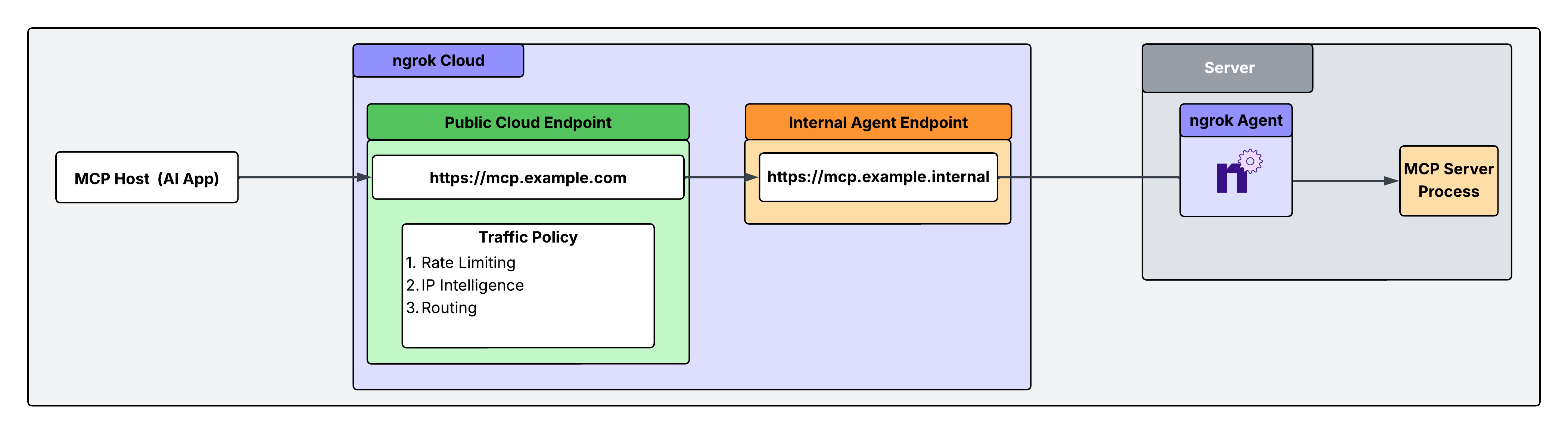
Declare an internal endpoint
Internal endpoints only receive traffic forwarded by the forward-internal action. Their hostnames must end with.internal.
Define one in the agent configuration file on the machine that runs your MCP server:
Create a Cloud Endpoint
Cloud Endpoints are always-on endpoints that you manage in the dashboard or API. They only use their attached Traffic Policy to handle connections. In your ngrok dashboard, go to Endpoints and click New. Give it a public URL such ashttps://mcp.example.com.
Attach Traffic Policy
Replace the Cloud Endpoint’s default Traffic Policy. This example admits only Anthropic’s API servers, requires anAuthorization header, rate limits per token, and forwards to the internal endpoint:
forward-internal action.
Test it
- Remove the token from your client config.
The request returns
401withAuthorization required. curlthe URL from your own machine. The request returns403because it doesn’t come from an Anthropic IP.- Send a prompt from Claude with the token set. The request reaches your MCP server.
Troubleshooting
Frequently asked questions
What is a remote MCP server?
What is a remote MCP server?
A remote MCP server is one an AI client reaches over HTTPS instead of starting it as a local process.
Cloud AI apps like ChatGPT, Claude.ai, and Grok only support remote servers.
ngrok turns a server on your machine into a remote MCP server by giving it a public URL, without deploying it anywhere.
How do I expose a local MCP server so ChatGPT or Cursor can reach it?
How do I expose a local MCP server so ChatGPT or Cursor can reach it?
Run your MCP server over HTTP, then run
ngrok http with its port and a Traffic Policy that requires a token or secret path.
Give the client your ngrok URL plus the server’s path, such as https://your-assigned-name.ngrok-free.dev/mcp.Does the ngrok URL change when I restart?
Does the ngrok URL change when I restart?
No.
Every ngrok account, including free, gets a dev domain that
ngrok http reuses on every run.Can I expose a stdio MCP server?
Can I expose a stdio MCP server?
Not directly.
Remote AI apps can’t start a process on your machine.
Run the server in HTTP mode, or wrap it with a stdio-to-HTTP bridge and point ngrok at the bridge’s port.
Is it safe to expose an MCP server to the internet?
Is it safe to expose an MCP server to the internet?
Only with authentication in front of it.
Require a bearer token, secret path, or OAuth, and rate limit requests on a paid plan.
ngrok applies these rules in its cloud, so rejected requests never reach your machine.
Do I need a paid ngrok plan?
Do I need a paid ngrok plan?
Not to start.
The free plan includes the dev domain, the bearer token and secret path rules, and the IP category rule in this guide.
The rate-limit and url-rewrite actions require a paid plan.
See pricing for what each plan includes, and free plan limits for request limits.
Can I reach an MCP server in a VPC or a customer's network?
Can I reach an MCP server in a VPC or a customer's network?
Yes.
Run the ngrok agent next to the server with an internal endpoint, and put a Cloud Endpoint with your Traffic Policy in front of it.
See Keep the server private.
What’s next
- Learn the Traffic Policy rules you can put in front of your server.
- Reach MCP servers in other networks with site-to-site connectivity.
- Put ngrok’s AI Gateway in front of your inference providers for routing and failover.