> ## Documentation Index
> Fetch the complete documentation index at: https://ngrok.com/docs/llms.txt
> Use this file to discover all available pages before exploring further.
# Traffic Identities
> Learn about Traffic Identities and Sessions for managing authenticated users via OAuth, OIDC, and SAML Traffic Policy actions.
## Overview
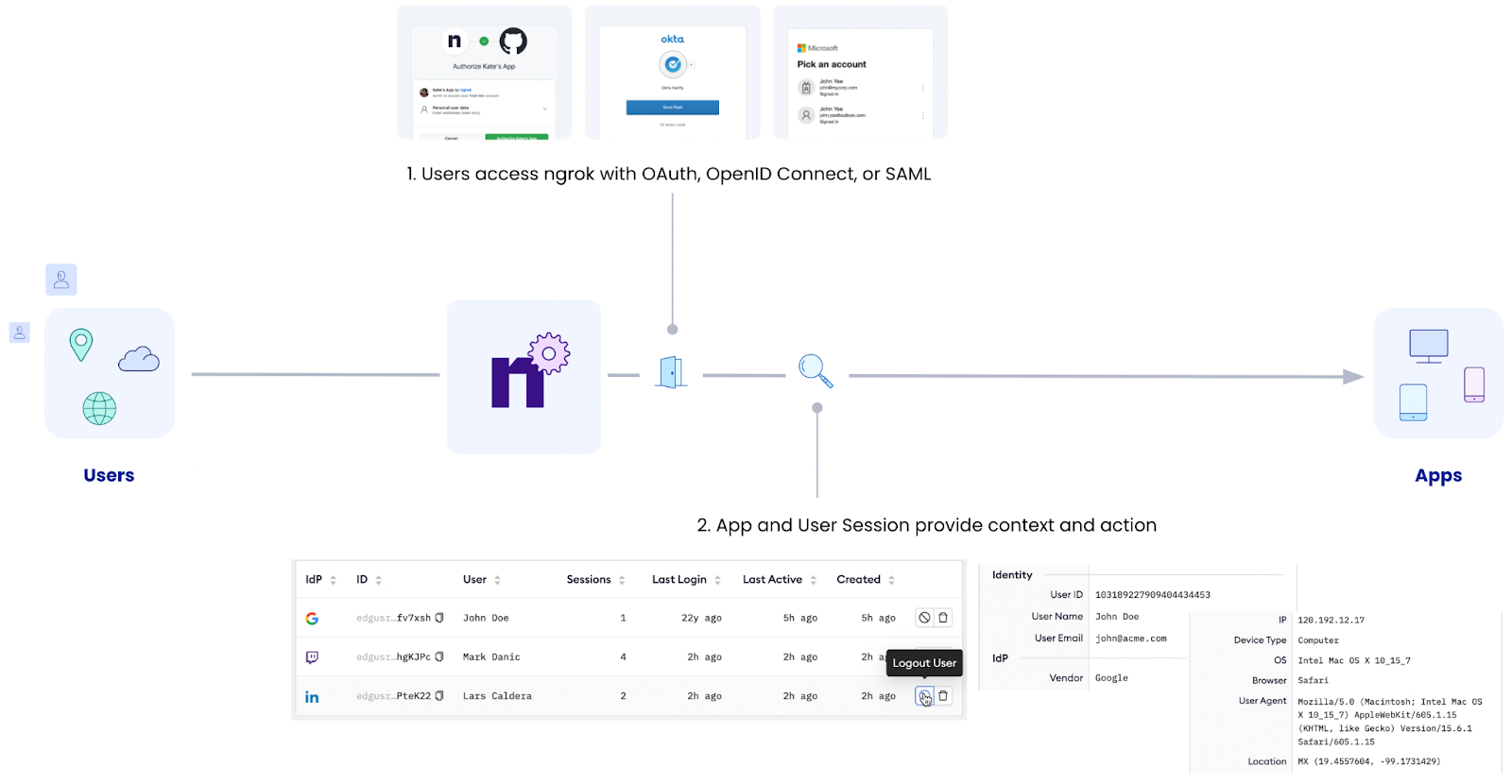
Identities and Sessions give you live visibility of users who have
authenticated to Endpoints via the [OAuth](/traffic-policy/actions/oauth/),
[OpenID Connect](/traffic-policy/actions/oidc/) and
[SAML](/traffic-policy/actions/saml/) Traffic Policy actions. They enable you
to:
* Examine active user sessions to your authenticated endpoints including
details like device, identity provider, IP address, and network
* Revoke sessions to forcibly log users out via the dashboard or API
You can manage Identities and Session on your [ngrok
Dashboard](https://dashboard.ngrok.com/app-users) or via the [ngrok API](#api).
Traffic Identities were previously called 'App Users', you may find references with the
old name while they are being transitioned.
 ## Managing sessions from the Dashboard
### View sessions
To view Traffic Identities and sessions:
1. In the [ngrok Dashboard](https://dashboard.ngrok.com), navigate to **Traffic Policy** > **Identities** (or access the [Identities](https://dashboard.ngrok.com/app-users) page directly)
The users are displayed in the table.
2. Alternatively, use the search bar to filter users by identity provider, User, and ID.
### View session details
1. Access the [Identities](https://dashboard.ngrok.com/app-users) page.
2. On the Identities table, select a user:
* ngrok displays the table with the user identity overview, including the provider who authenticated your user, basic information about the user, and the identity provider used for login
* ngrok also displays a list of endpoints the user has accessed.
3. Click on an endpoint that the user has accessed.
ngrok displays session information captured while the user was accessing the endpoint. That includes the user device, IP, browser, agent, country, and geo coordinates based on IP
Pasting the coordinates into your favorite mapping service will give you more detailed information about the IP geolocation.
### Revoke sessions
1. Access the [Identities](https://dashboard.ngrok.com/app-users) page and locate your user.
2. Click the trash can next to the user and then confirm the deletion.
The user is deleted and all sessions are invalidated immediately.
Users can reinitiate sessions by logging in again via their Authentication provider.
## Managing Sessions from the API
You can also programmatically investigate and revoke user sessions using the [Identities](/api-reference/applicationusers/list) and [App Sessions](/api-reference/applicationsessions/list) APIs. APIs are the recommended approach when you want to drive session monitoring and deletion from third-party apps such as security management solutions and identity workflows.
Examples:
### To list user sessions
```bash theme={null}
curl --location --request \
GET 'https://api.ngrok.com/app/users' \
--header 'Ngrok-Version: 2' \
--header 'Authorization: Bearer {ngrok api token}'
```
### To get session details
```bash theme={null}
curl --location --request \
GET 'https://api.ngrok.com/app/users/{session-id}' \
--header 'Ngrok-Version: 2' \
--header 'Authorization: Bearer {ngrok api token}'
```
### To revoke a session
```bash theme={null}
curl --location --request \
DELETE 'https://api.ngrok.com/app/users/{session-id}' \
--header 'Ngrok-Version: 2' \
--header 'Authorization: Bearer {ngrok api token}'
```
## API
Identities and Sessions are managed programmatically via:
* [/app/users API Resource](/api-reference/applicationusers/list)
* [/app/sessions API Resource](/api-reference/applicationsessions/list)
## Traffic Policy identities pricing
Identities and Session are available on all plans.
## Managing sessions from the Dashboard
### View sessions
To view Traffic Identities and sessions:
1. In the [ngrok Dashboard](https://dashboard.ngrok.com), navigate to **Traffic Policy** > **Identities** (or access the [Identities](https://dashboard.ngrok.com/app-users) page directly)
The users are displayed in the table.
2. Alternatively, use the search bar to filter users by identity provider, User, and ID.
### View session details
1. Access the [Identities](https://dashboard.ngrok.com/app-users) page.
2. On the Identities table, select a user:
* ngrok displays the table with the user identity overview, including the provider who authenticated your user, basic information about the user, and the identity provider used for login
* ngrok also displays a list of endpoints the user has accessed.
3. Click on an endpoint that the user has accessed.
ngrok displays session information captured while the user was accessing the endpoint. That includes the user device, IP, browser, agent, country, and geo coordinates based on IP
Pasting the coordinates into your favorite mapping service will give you more detailed information about the IP geolocation.
### Revoke sessions
1. Access the [Identities](https://dashboard.ngrok.com/app-users) page and locate your user.
2. Click the trash can next to the user and then confirm the deletion.
The user is deleted and all sessions are invalidated immediately.
Users can reinitiate sessions by logging in again via their Authentication provider.
## Managing Sessions from the API
You can also programmatically investigate and revoke user sessions using the [Identities](/api-reference/applicationusers/list) and [App Sessions](/api-reference/applicationsessions/list) APIs. APIs are the recommended approach when you want to drive session monitoring and deletion from third-party apps such as security management solutions and identity workflows.
Examples:
### To list user sessions
```bash theme={null}
curl --location --request \
GET 'https://api.ngrok.com/app/users' \
--header 'Ngrok-Version: 2' \
--header 'Authorization: Bearer {ngrok api token}'
```
### To get session details
```bash theme={null}
curl --location --request \
GET 'https://api.ngrok.com/app/users/{session-id}' \
--header 'Ngrok-Version: 2' \
--header 'Authorization: Bearer {ngrok api token}'
```
### To revoke a session
```bash theme={null}
curl --location --request \
DELETE 'https://api.ngrok.com/app/users/{session-id}' \
--header 'Ngrok-Version: 2' \
--header 'Authorization: Bearer {ngrok api token}'
```
## API
Identities and Sessions are managed programmatically via:
* [/app/users API Resource](/api-reference/applicationusers/list)
* [/app/sessions API Resource](/api-reference/applicationsessions/list)
## Traffic Policy identities pricing
Identities and Session are available on all plans.