> ## Documentation Index
> Fetch the complete documentation index at: https://ngrok.com/docs/llms.txt
> Use this file to discover all available pages before exploring further.
# Webhooks to On-Prem Full Tutorial
> Follow an in-depth tutorial to set up webhook verification and routing to your internal services, all managed by a single Traffic Policy.
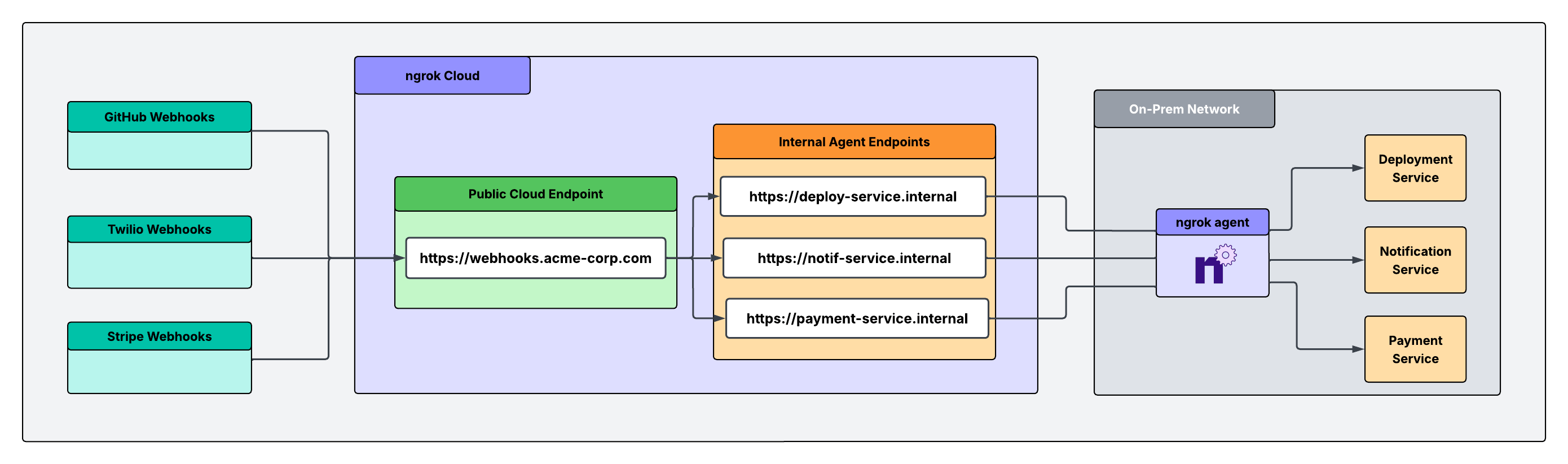
This guide sets up a single entry point where webhooks access your internal services. Verify and route requests from third-party providers without opening your firewall or using a VPN.
ngrok can verify webhooks from 70+ providers out of the box. See the complete
list of [supported webhook
providers](/docs/traffic-policy/actions/verify-webhook/#supported-providers).
## How it works
Webhooks hit one public address that you configure for your Cloud Endpoint. A single Traffic Policy on that address checks the signature on every request, rejects anything that fails, and only forwards verified requests. The ngrok agent opens an outbound connection to ngrok and forwards webhook traffic to your internal service, so you never have to open an inbound port or tap your firewall.
 ## Three ways teams use this
The webhook gateway shape is the same for everyone. What differs is where your service runs and what you most need to guarantee:
* **Behind a firewall:** Your service runs on-prem or in a private network that blocks inbound connections. Webhooks reach your port without you having to open inbound connections.
* **Regulated workloads:** Your service handles PHI or other regulated data, often in a cloud container. The path has to be end-to-end encrypted and must not capture or store payloads.
* **Platform-governed:** A platform team owns service configuration, access, and auth from a single surface. Endpoints and policy are declared as version-controlled config, and agents are scoped so developers can't create shadow exposure.
In this tutorial, you'll build the shared front door in steps 1–4, then apply the guardrail for your scenario in step 5.
## Tutorial
### What you'll need
* An ngrok account. If you don't have one, [sign up](https://dashboard.ngrok.com/signup).
* The [ngrok agent](/docs/getting-started/), one of the [SDKs](/docs/agent-sdks), or the [Kubernetes Operator](/docs/k8s) installed where your service runs.
* The webhook signing secret for each provider you want to verify. You can find these in each provider's developer dashboard.
* (Optional) The ngrok agent CLI if you want to create a vault for your webhook secrets.
### 1. Give the receiving service a private address
Each service that handles webhooks gets an internal [Agent Endpoint](/docs/gateway/agent-endpoints/): a private address that only receives traffic when it's forwarded through the [`forward-internal`](/docs/traffic-policy/actions/forward-internal/) action. Internal endpoint hostnames must end with `.internal`.
How you create it depends on where the service runs.
Run the agent next to your service. It connects outbound over TLS on port 443, so nothing needs to change on the firewall.
```bash theme={null}
ngrok http $SERVICE_PORT --url https://payment-service.internal
```
Run the agent (or an [SDK](/docs/agent-sdks)) inside the container alongside your app. The container only needs outbound network access—no ingress rule, no public IP—so a workload with an egress-only policy can still receive webhooks.
```bash theme={null}
ngrok http $SERVICE_PORT --url https://payment-service.internal
```
Let the [ngrok Operator](/docs/k8s/) manage the endpoint as a version-controlled resource, so the platform team owns it in Git rather than in someone's shell history.
```yaml theme={null}
apiVersion: ngrok.k8s.ngrok.com/v1alpha1
kind: AgentEndpoint
metadata:
name: payment-service
namespace: webhooks
spec:
url: https://payment-service.internal
upstream:
url: http://payment-service.webhooks:8080
```
Repeat for every service that will receive webhook, for example, `notif-service.internal` and `deploy-service.internal`.
### 2. Create the front door
Navigate to the [**Endpoints**](https://dashboard.ngrok.com/endpoints) section of the dashboard, click **New +**, then **Cloud Endpoint**, and enter the domain you want to use for your public URL. (In Kubernetes, you can create this as a [`CloudEndpoint`](/docs/k8s/crds/cloudendpoint/) resource instead.)
### 3. (Optional) Store your signing secrets in a vault
Each route verifies a provider's signature using that provider's signing secret. For production, keep those secrets in [Secrets for Traffic Policy](/docs/traffic-policy/secrets) so they're encrypted and referenced by name rather than pasted in plaintext. This step is optional, but a vault keeps secrets out of your policy source and lets you rotate them without editing routes.
```bash theme={null}
ngrok api vaults create --name "webhook-secrets" --description "Webhook validation secrets"
```
Add each provider's secret, changing `$VAULT_ID` to match the vault ID returned above:
```bash theme={null}
ngrok api secrets create --name "github-secret" --value "your_github_webhook_secret_here" --vault-id "$VAULT_ID"
ngrok api secrets create --name "twilio-secret" --value "your_twilio_auth_token_here" --vault-id "$VAULT_ID"
ngrok api secrets create --name "stripe-secret" --value "your_stripe_secret_here" --vault-id "$VAULT_ID"
```
### 4. Verify the sender and route inward
On your Cloud Endpoint's Traffic Policy, each rule matches a provider by request path, verifies the signature with [`verify-webhook`](/docs/traffic-policy/actions/verify-webhook), and forwards verified requests to the matching internal service with [`forward-internal`](/docs/traffic-policy/actions/forward-internal/). A request with a bad or missing signature is rejected with a `403`.
```yaml theme={null}
on_http_request:
- expressions:
- "req.url.path.startsWith('/github')"
actions:
- type: verify-webhook
config:
provider: github
secret: "${secrets.get('webhook-secrets', 'github-secret')}"
- type: forward-internal
config:
url: https://deploy-service.internal
- expressions:
- "req.url.path.startsWith('/twilio')"
actions:
- type: verify-webhook
config:
provider: twilio
secret: "${secrets.get('webhook-secrets', 'twilio-secret')}"
- type: forward-internal
config:
url: https://notif-service.internal
- expressions:
- "req.url.path.startsWith('/stripe')"
actions:
- type: verify-webhook
config:
provider: stripe
secret: "${secrets.get('webhook-secrets', 'stripe-secret')}"
- type: forward-internal
config:
url: https://payment-service.internal
```
```yaml theme={null}
on_http_request:
- expressions:
- "req.url.path.startsWith('/github')"
actions:
- type: verify-webhook
config:
provider: github
secret: "your_github_webhook_secret_here"
- type: forward-internal
config:
url: https://deploy-service.internal
- expressions:
- "req.url.path.startsWith('/twilio')"
actions:
- type: verify-webhook
config:
provider: twilio
secret: "your_twilio_auth_token_here"
- type: forward-internal
config:
url: https://notif-service.internal
- expressions:
- "req.url.path.startsWith('/stripe')"
actions:
- type: verify-webhook
config:
provider: stripe
secret: "your_stripe_secret_here"
- type: forward-internal
config:
url: https://payment-service.internal
```
### 5. Add the guardrail your use case needs
The front door verifies and routes for everyone. Layer on additional security depending on what you need most.
Nothing more is required: the agent's connection is outbound-only over port 443, and your `.internal` services are only reachable through `forward-internal`.
For PHI or other regulated data, keep the payload encrypted the whole way and make sure ngrok never retains it:
* **End-to-end encryption.** Terminate TLS within your network at [the ngrok agent](/docs/agent/agent-tls-termination) or at your upstream service. With this configuration, ngrok forwards ciphertext rather than decrypting traffic at the edge.
* **No stored payloads.** Leave full traffic capture off. Use TCP or TLS endpoints to bypass all traffic capture, including most request metadata.
Review ngrok's compliance posture and request a BAA through the [Trust Center](https://trust.ngrok.com) before sending regulated data.
Let the platform team issue ACL-bound authtokens and manage Traffic Policy config as code.
* **Scope the agent's authtoken with an ACL** so you define what endpoints that agent can start. See [Authtoken ACLs](/docs/agent/cli-api) for the full syntax, but as an example:
```
bind:deploy-service.internal
```
* **Declare endpoints and policy as version-controlled resources**.
### 6. Configure your webhook URL at each provider and test
Add your ngrok URL and provider-specific webhook path within each provider's dashboard:
* **GitHub**: `https://$NGROK_DOMAIN/github`
* **Twilio**: `https://$NGROK_DOMAIN/twilio`
* **Stripe**: `https://$NGROK_DOMAIN/stripe`
Most providers offer a "send test event" button. Trigger one and watch it flow through: a valid event is verified and forwarded to the matching internal service, while a request with a bad or missing signature is rejected at the front door. You can confirm what happened for each request in the [Traffic Inspector](https://dashboard.ngrok.com/traffic-inspector). If you turned the inspector off for a regulated endpoint, verify against your own service logs instead.
## Verifying a provider that isn't on the supported list
`verify-webhook` supports a fixed set of [providers](/docs/traffic-policy/actions/verify-webhook/#supported-providers). If your webhook provider isn't on the list, here are your options:
### Use a Traffic Policy expression
If the provider authenticates by sending a static secret in a header or query parameter, check for the header in a Traffic Policy expression and reject anything that fails:
```yaml theme={null}
on_http_request:
- expressions:
- "req.headers.get('x-webhook-secret') != '${secrets.get('webhook-secrets', 'shared-secret')}'"
actions:
- type: deny
config:
status_code: 403
# forward-internal rules follow
```
Combine with the [`restrict-ips`](/docs/traffic-policy/actions/restrict-ips) action locked to the provider's published IP ranges or with `jwt-validation` if the webhook arrives as a signed JWT.
### Ask us to add it
Email us at [support@ngrok.com](mailto:support@ngrok.com) to [request your provider](/docs/traffic-policy/actions/verify-webhook/#supported-providers).
## Three ways teams use this
The webhook gateway shape is the same for everyone. What differs is where your service runs and what you most need to guarantee:
* **Behind a firewall:** Your service runs on-prem or in a private network that blocks inbound connections. Webhooks reach your port without you having to open inbound connections.
* **Regulated workloads:** Your service handles PHI or other regulated data, often in a cloud container. The path has to be end-to-end encrypted and must not capture or store payloads.
* **Platform-governed:** A platform team owns service configuration, access, and auth from a single surface. Endpoints and policy are declared as version-controlled config, and agents are scoped so developers can't create shadow exposure.
In this tutorial, you'll build the shared front door in steps 1–4, then apply the guardrail for your scenario in step 5.
## Tutorial
### What you'll need
* An ngrok account. If you don't have one, [sign up](https://dashboard.ngrok.com/signup).
* The [ngrok agent](/docs/getting-started/), one of the [SDKs](/docs/agent-sdks), or the [Kubernetes Operator](/docs/k8s) installed where your service runs.
* The webhook signing secret for each provider you want to verify. You can find these in each provider's developer dashboard.
* (Optional) The ngrok agent CLI if you want to create a vault for your webhook secrets.
### 1. Give the receiving service a private address
Each service that handles webhooks gets an internal [Agent Endpoint](/docs/gateway/agent-endpoints/): a private address that only receives traffic when it's forwarded through the [`forward-internal`](/docs/traffic-policy/actions/forward-internal/) action. Internal endpoint hostnames must end with `.internal`.
How you create it depends on where the service runs.
Run the agent next to your service. It connects outbound over TLS on port 443, so nothing needs to change on the firewall.
```bash theme={null}
ngrok http $SERVICE_PORT --url https://payment-service.internal
```
Run the agent (or an [SDK](/docs/agent-sdks)) inside the container alongside your app. The container only needs outbound network access—no ingress rule, no public IP—so a workload with an egress-only policy can still receive webhooks.
```bash theme={null}
ngrok http $SERVICE_PORT --url https://payment-service.internal
```
Let the [ngrok Operator](/docs/k8s/) manage the endpoint as a version-controlled resource, so the platform team owns it in Git rather than in someone's shell history.
```yaml theme={null}
apiVersion: ngrok.k8s.ngrok.com/v1alpha1
kind: AgentEndpoint
metadata:
name: payment-service
namespace: webhooks
spec:
url: https://payment-service.internal
upstream:
url: http://payment-service.webhooks:8080
```
Repeat for every service that will receive webhook, for example, `notif-service.internal` and `deploy-service.internal`.
### 2. Create the front door
Navigate to the [**Endpoints**](https://dashboard.ngrok.com/endpoints) section of the dashboard, click **New +**, then **Cloud Endpoint**, and enter the domain you want to use for your public URL. (In Kubernetes, you can create this as a [`CloudEndpoint`](/docs/k8s/crds/cloudendpoint/) resource instead.)
### 3. (Optional) Store your signing secrets in a vault
Each route verifies a provider's signature using that provider's signing secret. For production, keep those secrets in [Secrets for Traffic Policy](/docs/traffic-policy/secrets) so they're encrypted and referenced by name rather than pasted in plaintext. This step is optional, but a vault keeps secrets out of your policy source and lets you rotate them without editing routes.
```bash theme={null}
ngrok api vaults create --name "webhook-secrets" --description "Webhook validation secrets"
```
Add each provider's secret, changing `$VAULT_ID` to match the vault ID returned above:
```bash theme={null}
ngrok api secrets create --name "github-secret" --value "your_github_webhook_secret_here" --vault-id "$VAULT_ID"
ngrok api secrets create --name "twilio-secret" --value "your_twilio_auth_token_here" --vault-id "$VAULT_ID"
ngrok api secrets create --name "stripe-secret" --value "your_stripe_secret_here" --vault-id "$VAULT_ID"
```
### 4. Verify the sender and route inward
On your Cloud Endpoint's Traffic Policy, each rule matches a provider by request path, verifies the signature with [`verify-webhook`](/docs/traffic-policy/actions/verify-webhook), and forwards verified requests to the matching internal service with [`forward-internal`](/docs/traffic-policy/actions/forward-internal/). A request with a bad or missing signature is rejected with a `403`.
```yaml theme={null}
on_http_request:
- expressions:
- "req.url.path.startsWith('/github')"
actions:
- type: verify-webhook
config:
provider: github
secret: "${secrets.get('webhook-secrets', 'github-secret')}"
- type: forward-internal
config:
url: https://deploy-service.internal
- expressions:
- "req.url.path.startsWith('/twilio')"
actions:
- type: verify-webhook
config:
provider: twilio
secret: "${secrets.get('webhook-secrets', 'twilio-secret')}"
- type: forward-internal
config:
url: https://notif-service.internal
- expressions:
- "req.url.path.startsWith('/stripe')"
actions:
- type: verify-webhook
config:
provider: stripe
secret: "${secrets.get('webhook-secrets', 'stripe-secret')}"
- type: forward-internal
config:
url: https://payment-service.internal
```
```yaml theme={null}
on_http_request:
- expressions:
- "req.url.path.startsWith('/github')"
actions:
- type: verify-webhook
config:
provider: github
secret: "your_github_webhook_secret_here"
- type: forward-internal
config:
url: https://deploy-service.internal
- expressions:
- "req.url.path.startsWith('/twilio')"
actions:
- type: verify-webhook
config:
provider: twilio
secret: "your_twilio_auth_token_here"
- type: forward-internal
config:
url: https://notif-service.internal
- expressions:
- "req.url.path.startsWith('/stripe')"
actions:
- type: verify-webhook
config:
provider: stripe
secret: "your_stripe_secret_here"
- type: forward-internal
config:
url: https://payment-service.internal
```
### 5. Add the guardrail your use case needs
The front door verifies and routes for everyone. Layer on additional security depending on what you need most.
Nothing more is required: the agent's connection is outbound-only over port 443, and your `.internal` services are only reachable through `forward-internal`.
For PHI or other regulated data, keep the payload encrypted the whole way and make sure ngrok never retains it:
* **End-to-end encryption.** Terminate TLS within your network at [the ngrok agent](/docs/agent/agent-tls-termination) or at your upstream service. With this configuration, ngrok forwards ciphertext rather than decrypting traffic at the edge.
* **No stored payloads.** Leave full traffic capture off. Use TCP or TLS endpoints to bypass all traffic capture, including most request metadata.
Review ngrok's compliance posture and request a BAA through the [Trust Center](https://trust.ngrok.com) before sending regulated data.
Let the platform team issue ACL-bound authtokens and manage Traffic Policy config as code.
* **Scope the agent's authtoken with an ACL** so you define what endpoints that agent can start. See [Authtoken ACLs](/docs/agent/cli-api) for the full syntax, but as an example:
```
bind:deploy-service.internal
```
* **Declare endpoints and policy as version-controlled resources**.
### 6. Configure your webhook URL at each provider and test
Add your ngrok URL and provider-specific webhook path within each provider's dashboard:
* **GitHub**: `https://$NGROK_DOMAIN/github`
* **Twilio**: `https://$NGROK_DOMAIN/twilio`
* **Stripe**: `https://$NGROK_DOMAIN/stripe`
Most providers offer a "send test event" button. Trigger one and watch it flow through: a valid event is verified and forwarded to the matching internal service, while a request with a bad or missing signature is rejected at the front door. You can confirm what happened for each request in the [Traffic Inspector](https://dashboard.ngrok.com/traffic-inspector). If you turned the inspector off for a regulated endpoint, verify against your own service logs instead.
## Verifying a provider that isn't on the supported list
`verify-webhook` supports a fixed set of [providers](/docs/traffic-policy/actions/verify-webhook/#supported-providers). If your webhook provider isn't on the list, here are your options:
### Use a Traffic Policy expression
If the provider authenticates by sending a static secret in a header or query parameter, check for the header in a Traffic Policy expression and reject anything that fails:
```yaml theme={null}
on_http_request:
- expressions:
- "req.headers.get('x-webhook-secret') != '${secrets.get('webhook-secrets', 'shared-secret')}'"
actions:
- type: deny
config:
status_code: 403
# forward-internal rules follow
```
Combine with the [`restrict-ips`](/docs/traffic-policy/actions/restrict-ips) action locked to the provider's published IP ranges or with `jwt-validation` if the webhook arrives as a signed JWT.
### Ask us to add it
Email us at [support@ngrok.com](mailto:support@ngrok.com) to [request your provider](/docs/traffic-policy/actions/verify-webhook/#supported-providers).