> ## Documentation Index
> Fetch the complete documentation index at: https://ngrok.com/docs/llms.txt
> Use this file to discover all available pages before exploring further.
# Connect URLs
> Learn how to customize the connect URL the ngrok agent uses to authenticate access to the ngrok service.
The Connect URL is the hostname and port the ngrok agent (and agent SDKs) uses to
establish its control connection to the ngrok service. By default, agents use
`connect.ngrok-agent.com:443`. You can change this per agent by setting the
[`connect_url`](/agent/config/v3/#connect-url) field in your configuration file.
## Custom connect URL
Create a custom Connect URL to customize how your agents connect (for example
`connect.example.com:443`). This involves delegating a DNS subdomain and
configuring certificates for the new address.
Key points:
* Agents connecting via your custom Connect URL must authenticate to your
ngrok account; connections using credentials from other accounts are rejected.
* Custom Connect URLs support both ngrok‑issued and Let's Encrypt certificates.
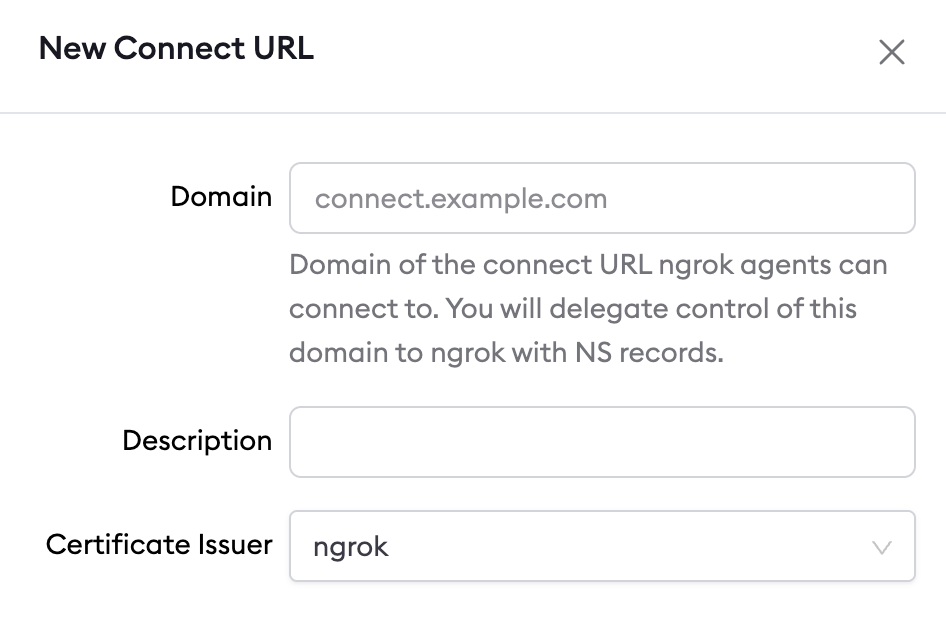
### Create a custom connect URL
1. Choose a domain you own
* You will delegate a subdomain via `NS` records to ngrok so it can manage the
required DNS (A/AAAA) and certificates.
2. Create the Connect URL entry
* In the Dashboard: [https://dashboard.ngrok.com/connect-urls](https://dashboard.ngrok.com/connect-urls)
* Or via API: [/api-reference/agentingresses/list/](/api-reference/agentingresses/list/)
3. Pick a certificate issuer
* ngrok Internal CA (fast, private CA, may require trust in some networks)
* Let's Encrypt (public CA, may require additional provisioning time)
### Delegate DNS records
After creation, the Dashboard prompts you to add `NS` records for the selected
subdomain at your DNS provider.
### Update Agent configuration
Point your agents at the new address by setting
[`connect_url`](/agent/config/v3/#connect-url). The helper command
[`ngrok config add-connect-url`](/agent/cli/#ngrok-config-add-connect-url) can
update your config for you.
For example, if the domain of your custom Connect URL is
`connect.example.com` then you might add the following line to the agent's
configuration file:
```bash theme={null}
ngrok config add-connect-url connect.example.com:443
```
```bash theme={null}
ssh -R 443:localhost:80 v2@connect.example.com http
```
```go theme={null}
import (
"context"
"net"
"os"
"golang.ngrok.com/ngrok/v2"
)
func ngrokListener(ctx context.Context) (net.Listener, error) {
agent, _ := ngrok.NewAgent(
ngrok.WithAuthtoken(os.Getenv("NGROK_AUTHTOKEN")),
ngrok.WithAgentConnectURL("connect.example.com:443"),
)
return agent.Listen(ctx)
}
```
```jsx theme={null}
const ngrok = require("@ngrok/ngrok");
(async function () {
const session = await new ngrok.SessionBuilder()
.authtokenFromEnv()
.serverAddr("connect.example.com:443")
.connect();
const listener = await session
.httpEndpoint()
.listenAndForward("http://localhost:8080");
console.log(`Ingress established at: ${listener.url()}`);
})();
```
Javascript SDK Docs:
* [https://ngrok.github.io/ngrok-javascript/classes/SessionBuilder.html#serveraddr](https://ngrok.github.io/ngrok-javascript/classes/SessionBuilder.html#serveraddr)
```python theme={null}
import ngrok, asyncio
async def create_listener() -> ngrok.Listener:
session: ngrok.Session = (
await ngrok.SessionBuilder()
.authtoken_from_env()
.server_addr("connect.example.com:443")
.connect()
)
return (await session.http_endpoint()
.listen_and_forward("http://localhost:8080"))
listener = asyncio.run(create_listener())
print(f"Ingress established at: {listener.url()}");
```
Python SDK Docs:
* [https://ngrok.github.io/ngrok-python/session\_builder.html#ngrok.SessionBuilder.server\_addr](https://ngrok.github.io/ngrok-python/session_builder.html#ngrok.SessionBuilder.server_addr)
```rust theme={null}
use ngrok::prelude::*;
async fn listen_ngrok() -> anyhow::Result {
let sess = ngrok::Session::builder()
.authtoken_from_env()
.server_addr("connect.example.com:443")
.connect()
.await?;
let tun = sess
.http_endpoint()
.listen()
.await?;
println!("Listening on URL: {:?}", tun.url());
Ok(tun)
}
```
Rust Crate Docs:
* [https://docs.rs/ngrok/latest/ngrok/session/struct.SessionBuilder.html#method.server\_addr](https://docs.rs/ngrok/latest/ngrok/session/struct.SessionBuilder.html#method.server_addr)
In your Helm values.yaml file, set
```
serverAddr: "connect.example.com:443"
```
## Regional scope and GSLB
Custom Connect URLs are pinned to a specific region for the agent's control
connection and do not use
[Global Server Load Balancing](/gateway/global-load-balancer/) for that
connection. End-user traffic to your endpoints is still delivered using GSLB.
## Dedicated IPs
When you create a custom Connect URL, the DNS and certificates are branded to your domain, but the address still resolves to ngrok's shared IPs.
If you need static, account-unique addresses, dedicated IPs are available. [Contact Sales](mailto:sales@ngrok.com?subject=Dedicated+Ingress+IPs) for details.
## Certificate issuer
When you create a custom Connect URL, choose one of two certificate issuers:
* ngrok's internal CA
* [Let's Encrypt](https://letsencrypt.org/)
 ### ngrok internal CA
* Default option; provisioned immediately.
* Trusted by the ngrok agent out of the box.
* Some enterprise inspection tools may not trust this private CA without
additional configuration.
### Let's Encrypt
* Public CA; useful when corporate proxies or network devices cannot trust
a private CA.
* May require setting `root_cas: host` (or providing the Let's Encrypt root)
for some SDKs and for the SSH Reverse Tunnel agent.
* Provisioning can take time (DNS propagation). ngrok issues a temporary
certificate until Let's Encrypt is ready. Even if DNS checks pass in the
Dashboard, Let's Encrypt may still be propagating.
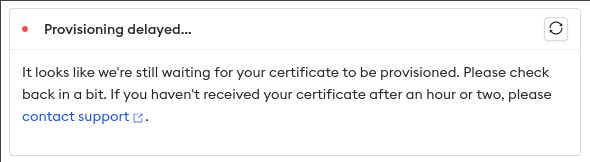
If you select Let's Encrypt, the Connect URL drawer shows a status card while
the certificate is provisioning:
### ngrok internal CA
* Default option; provisioned immediately.
* Trusted by the ngrok agent out of the box.
* Some enterprise inspection tools may not trust this private CA without
additional configuration.
### Let's Encrypt
* Public CA; useful when corporate proxies or network devices cannot trust
a private CA.
* May require setting `root_cas: host` (or providing the Let's Encrypt root)
for some SDKs and for the SSH Reverse Tunnel agent.
* Provisioning can take time (DNS propagation). ngrok issues a temporary
certificate until Let's Encrypt is ready. Even if DNS checks pass in the
Dashboard, Let's Encrypt may still be propagating.
If you select Let's Encrypt, the Connect URL drawer shows a status card while
the certificate is provisioning:
 Certificates issued by Let's Encrypt through ngrok are securely managed.
Private keys are not exposed to requesters.
## Why customize the connect URL?
### Branded connectivity
If you use ngrok for production connectivity (devices in the field or customer
environments), a custom Connect URL lets you brand connectivity with your
domain.
### Policy enforcement
For development and testing, a custom Connect URL helps enforce policy:
* Ensure developers use a shared ngrok account (not personal accounts).
* Block default Connect URLs on corp networks while allowing your custom URL.
## Pricing
Custom Connect URLs are not available on self‑serve plans.
[Contact Sales](mailto:sales@ngrok.com?subject=Custom+Connect+URL) to discuss options.
Certificates issued by Let's Encrypt through ngrok are securely managed.
Private keys are not exposed to requesters.
## Why customize the connect URL?
### Branded connectivity
If you use ngrok for production connectivity (devices in the field or customer
environments), a custom Connect URL lets you brand connectivity with your
domain.
### Policy enforcement
For development and testing, a custom Connect URL helps enforce policy:
* Ensure developers use a shared ngrok account (not personal accounts).
* Block default Connect URLs on corp networks while allowing your custom URL.
## Pricing
Custom Connect URLs are not available on self‑serve plans.
[Contact Sales](mailto:sales@ngrok.com?subject=Custom+Connect+URL) to discuss options.