# Let your coding agent set up AI Gateway for your next feature
> The ngrok MCP server can now create and change your AI Gateway setup, so one prompt to your coding agent gets you a virtual model, a locked-down key, and the code that calls it.
- Date: 2026-11-17
- Shipped by: Brenden Ehlers, Alice Wasko, and Prakhar Sinha
- Products: AI Gateway
- URL: https://ngrok.com/changelog/ai-gateway-mcp-write-tools
Say your help desk app needs a **Summarize** button on long ticket threads. The code is the easy part. The setup is the detour: open the AI Gateway dashboard, build a virtual model, write an access config so the app's key can't wander off to pricier models, create the key, copy its token, then go back to your editor and explain all of it to your coding agent.
The agent can take that detour for you now. The [ngrok MCP server](https://ngrok.com/docs/mcp-server) has tools that create and update AI Gateway virtual models, access configs, access keys, custom providers, provider keys, firewall policies, and gateway settings. Give your agent the whole feature in one prompt:
> Add a Summarize button to ticket threads. Call AI Gateway through a virtual model named `ticket-summarizer` that tries Claude Haiku 5.5 first and falls back to Gemini 3.8 Flash. Give the app its own key that can only use those two models.
Your agent picks its own tools, so the steps vary. Here's how one run went. Steps 2 through 4, including the trip to the browser, took two minutes:
1. `aigw_list_models` checks the model IDs and prices. `anthropic/claude-haiku-5-5` costs $0.10 per million input tokens and $0.50 per million output tokens.
2. `aigw_create_virtual_model` saves `ticket-summarizer` with Claude Haiku 5.5 first and `google/gemini-3.8-flash` second.
3. `aigw_create_access_config` creates `help-desk-summaries`, which allows those two models and nothing else.
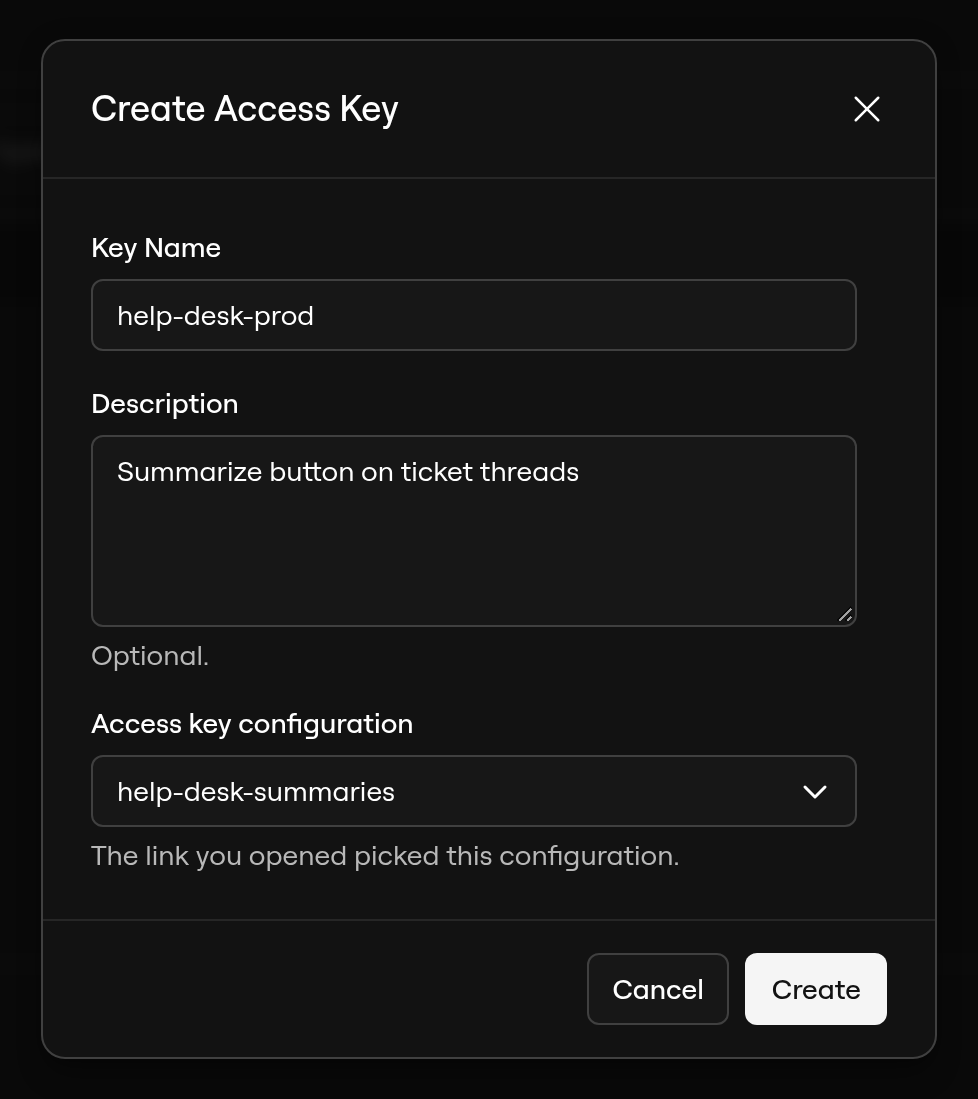
4. `aigw_create_access_key` sends you a link to the AI dashboard with the key's name, description, and config already filled in.
5. The agent writes the endpoint with `model: "ticket-summarizer"`, and you run it.
Step 4 is where you come in. Access key tokens never go through the chat, so the agent can't paste one into a transcript or a commit. You click **Create**, copy the token into `.env.local`, and tell the agent you're done. It checks that the key exists and carries on. The tool reports "The token was shown only to the user," then the key, trimmed here:
```text
status: complete
key:
name: help-desk-prod
access_config: help-desk-summaries (aigac_…)
```
## Why the agent should reach for a virtual model
Your app code names `ticket-summarizer`, not a vendor. If Claude Haiku 5.5 has a bad afternoon, the gateway moves on to Gemini 3.8 Flash and the button keeps working. When you'd rather try GPT-6.1 Terra first next month, ask the agent to reorder the list. Nobody redeploys the help desk. The [virtual models guide](https://ngrok.com/docs/ai-gateway/guides/virtual-models) covers failover and limits.
Running a model of your own, like a fine-tune on your own GPU? Ask the agent to add it as a custom provider with `aigw_create_provider` and put it at the top of `ticket-summarizer`. The agent never sees provider API keys either. `aigw_create_provider_key` sends you a dashboard link, the same way access keys do.
## What the agent can and can't do
- Each change hits live traffic right away. Tools that can break traffic, such as updating a virtual model, access config, custom provider, firewall policy, or gateway settings, are marked destructive, so most clients ask you first. Keep those prompts on.
- Every tool needs the same write scope the dashboard uses, such as `ai-gateway:virtual-models:write`, and your ngrok role still applies. The [tools and scopes reference](https://ngrok.com/docs/mcp-server/tools) lists each one.
- The agent can't spend your money. `aigw_add_credits` hands you the billing page and buys nothing.
- Deletes go through the existing `delete_resource` tool and fail while something still uses the resource.
## Get started
You need an ngrok account with AI Gateway credits. Claude Haiku 5.5 and Gemini 3.8 Flash bill to your ngrok credits, so you don't need an Anthropic or Google account. The example uses the OpenAI SDK's chat completions format, which both models support.
[Create an ngrok account or sign in](https://app.ngrok.ai/), and check your balance under [**Credits**](https://app.ngrok.ai/billing).
Add `https://mcp.ngrok.com/mcp` to your coding agent and sign in. With Claude Code, run:
```bash
claude mcp add --transport http --scope user ngrok https://mcp.ngrok.com/mcp
claude mcp login ngrok
```
Approve the AI Gateway write scopes on the consent screen. The [quickstart](https://ngrok.com/docs/mcp-server#quickstart) has commands for Codex, Cursor, Amp, and other clients.
Open your app's repo in your agent and send the prompt from above. Approve each change it proposes.
Open the link the agent sends, check the name and config, and click **Create**. Copy the token into `.env.local`, keep that file out of version control, and tell the agent you're done:
```dotenv
AI_GATEWAY_API_KEY=your_access_key_here
```
The agent writes the endpoint in your app's style and adds the OpenAI SDK if your app doesn't have it yet. Check two things in its diff: it reads the key from `AI_GATEWAY_API_KEY`, and it sends `ticket-summarizer` as the model. At its core, the call looks like this:
```typescript
import OpenAI from "openai";
const client = new OpenAI({
baseURL: "https://gateway.ngrok.ai/v1",
apiKey: process.env.AI_GATEWAY_API_KEY,
});
export async function summarizeThread(thread: string) {
const response = await client.chat.completions.create({
model: "ticket-summarizer",
messages: [
{
role: "system",
content: "Summarize this thread in one sentence, with the next step.",
},
{ role: "user", content: thread },
],
});
return response.choices[0]?.message.content;
}
```
Ask the agent to run the new endpoint against a sample thread, such as this one:
```text
Customer: CSV exports time out after 30 seconds.
Agent: Which workspace?
Customer: acme-prod. It started after Tuesday's update.
```
You get a one-sentence summary. One run returned this, and the wording varies between runs:
> CSV exports in the acme-prod workspace have been timing out after 30 seconds since Tuesday's update, so the next step is to investigate whether that update caused the issue.
Then ask the agent to try the same call with `openai/gpt-6.1-terra`. The key does exactly what the access config says, so the gateway refuses it:
```text
403 [ERR_NGROK_27232] Model "openai/gpt-6.1-terra" is not allowed by the access policy.
```
Ask your agent "Which model served my last AI Gateway requests, and what did they cost?" It answers with `aigw_list_usage`, one of the [AI Gateway read tools](https://ngrok.com/docs/mcp-server/ai-gateway). In the run above, Claude Haiku 5.5 from Anthropic answered each request on the first attempt, with 79 input tokens and about 150 output tokens, for about $0.0001 a summary.
If Claude Haiku 5.5 fails, the agent can also show each model the gateway tried. That needs [request capture](https://ngrok.com/docs/ai-gateway/guides/account-settings) turned on. The same details are in [**Logs**](https://app.ngrok.ai/activity) if you'd rather look for yourself.