# Make music with Google's Lyria models in AI Gateway
> Lyria 3.5 writes full songs and Lyria 3 Clip Preview makes 30-second clips, at a flat price per song on your ngrok credits.
- Date: 2026-10-30
- Shipped by: Brenden Ehlers and Alice Wasko
- Products: AI Gateway
- URL: https://ngrok.com/changelog/ai-gateway-lyria-music
Your app can write songs now. AI Gateway serves Google's Lyria music models on the Gemini Interactions API, so the access key and credits that already answer your chat requests can also commission a sea shanty.
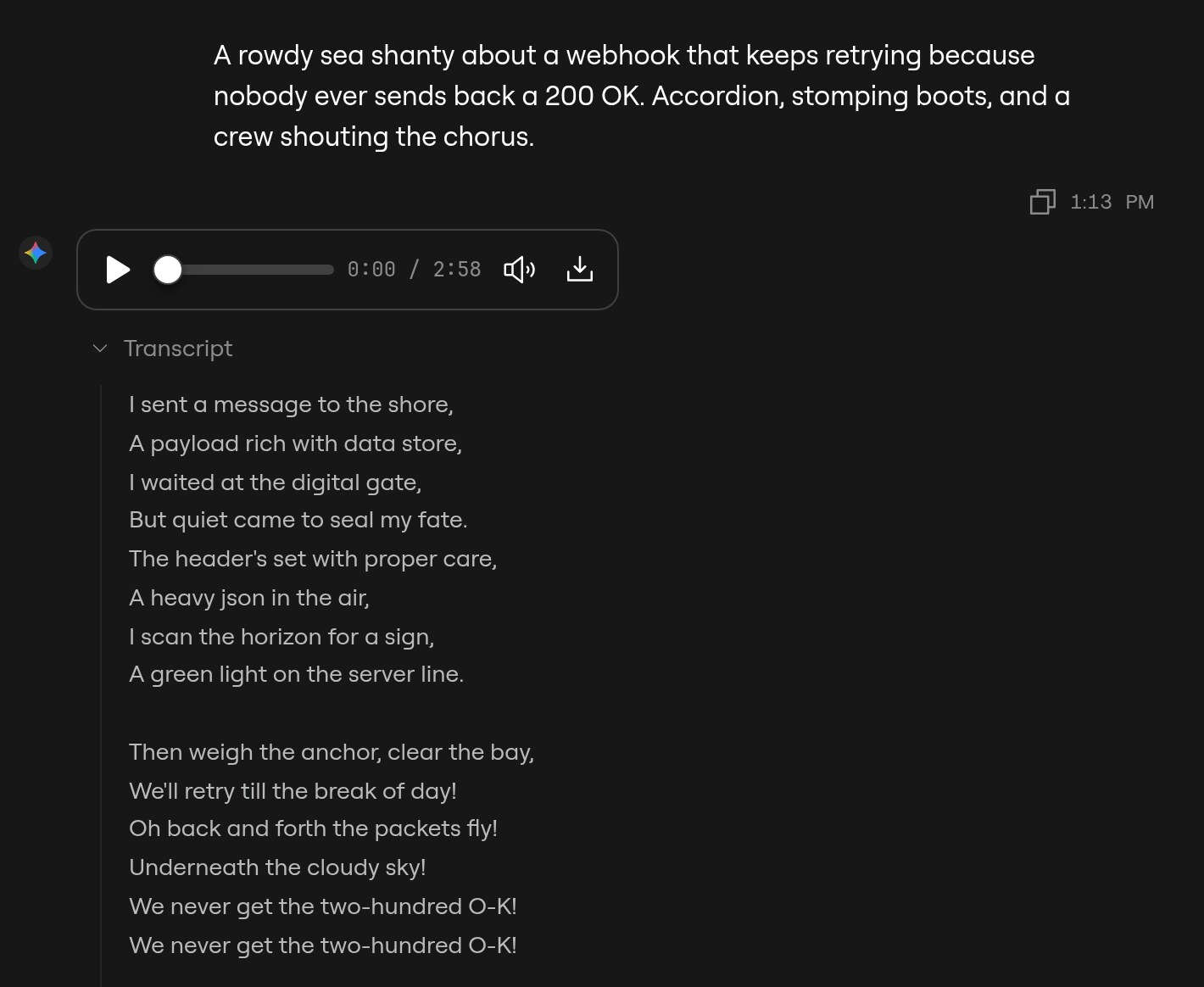
So we commissioned one. We asked **Lyria 3.5** for a shanty about a webhook that never gets a 200 OK. It came back as a three-minute song with an accordion, a lead singer who has clearly been on call too long, and a crew stomping through this chorus:
> Then weigh the anchor, clear the bay,\
> We'll retry till the break of day!
The whole 2:58 shanty, straight from Lyria 3.5.
Two Lyria models run on ngrok-managed inference:
| Model ID | What it makes | Price per song |
| ---------------------- | ---------------------------------------------------- | -------------- |
| `lyria-3.5` | Full-length songs with verses, choruses, and bridges | $0.08 |
| `lyria-3-clip-preview` | 30-second clips, loops, and previews | $0.04 |
Use the clip model for game loops, video intros, and hold music, and the full model when your app needs an actual song. Google prices Lyria per request, not per token, so a 45-second jingle and a three-minute epic from Lyria 3.5 cost the same. AI Gateway charges that price to your ngrok credits, plus the standard [processing fee](https://ngrok.com/docs/ai-gateway/concepts/credits#processing-fee), which came to $0.00017 on our shanty. Check [**Model Catalog**](https://app.ngrok.ai/models) for current pricing. With your own Google key attached to the gateway, Google bills you directly.
In the [playground](https://app.ngrok.ai/playground), pick **Lyria 3.5** or **Lyria 3 Clip Preview** and describe a song. The reply comes back with a player you can play, seek, and **Download**, and the lyrics sit under **Transcript**. **Stop** is off while a song generates, because Google bills the song even if you cut the request short.
## Get started
[Create an ngrok account or sign in](https://app.ngrok.ai/). Create an [**access key**](https://app.ngrok.ai/keys) that allows Google, and confirm your account has credits. To use your own Google key instead, attach it to the gateway.
To hear the shanty before you write any code, send the prompt below in the [playground](https://app.ngrok.ai/playground) with **Lyria 3.5**.
This example uses Google's Gen AI SDK for TypeScript, because Lyria runs on Google's native Interactions API. The [Google Gen AI SDK guide](https://ngrok.com/docs/ai-gateway/sdks/google) covers the rest of the SDK setup. Install the SDK and a TypeScript runner:
```bash
npm install @google/genai && npm install --save-dev tsx
```
Save your ngrok access key in `.env.local`. Keep this file out of version control:
```bash
AI_GATEWAY_API_KEY=your_access_key_here
```
The example asks for the same shanty, prints its lyrics, and saves the song. Use an ES module project (`"type": "module"` in `package.json`) for top-level `await`. Save this example as `index.ts`:
```typescript
import { writeFile } from "node:fs/promises";
import { GoogleGenAI } from "@google/genai";
const client = new GoogleGenAI({
apiKey: process.env.AI_GATEWAY_API_KEY,
httpOptions: {
baseUrl: "https://gateway.ngrok.ai",
apiVersion: "v1beta",
},
});
const interaction = await client.interactions.create({
model: "lyria-3.5",
input:
"A rowdy sea shanty about a webhook that keeps retrying because nobody ever sends back a 200 OK. Accordion, stomping boots, and a crew shouting the chorus.",
});
console.log(interaction.output_text);
const song = interaction.output_audio;
if (song?.data) {
await writeFile("shanty.mp3", Buffer.from(song.data, "base64"));
console.log("Saved shanty.mp3");
}
```
Run the example from your project directory. A full song takes a little while, so give it about half a minute:
```bash
node --env-file=.env.local --import tsx index.ts
```
`interaction.output_text` holds the lyrics, and `interaction.output_audio.data` holds the song as base64 MP3. The lyrics keep Lyria's song markup, such as `[[A0]]` and `[:]`, so strip it before you show the words to a person. Here's the start of one real run. Your crew sings a different shanty every time:
```text
[[A0]]
[:] Come all you brave coders and listen to me,
[:] Of a webhook that sailed on a boundless IP.
...
[:] (Retry!) (Retry!) (Give me that 200!)
Saved shanty.mp3
```
For a WAV file instead of MP3, add `response_format: { type: "audio", mime_type: "audio/wav" }` to the request. The price stays the same. For a 30-second loop, change `model` to `"lyria-3-clip-preview"`.
Open [**Activity**](https://app.ngrok.ai/activity), find the request that wrote your shanty, and inspect its model, provider, and status. **Usage** shows `1 request`, and **Cost** shows the song price plus the processing fee.