# Call any AI Gateway model from the SDK you already use
> AI Gateway now translates between the OpenAI, Anthropic, Gemini, and Bedrock API formats, so trying a model from another provider is a one-line change instead of a new SDK.
- Date: 2026-11-20
- Shipped by: Alice Wasko, Jarod Clark, and Mohamed
- Products: AI Gateway
- URL: https://ngrok.com/changelog/ai-gateway-any-model-any-sdk
Say your app talks to Claude through the Anthropic SDK, and you want to see how GPT-6.2 Sol handles the same prompts. Until today, AI Gateway couldn't help much with that. The Anthropic SDK always sends Anthropic Messages requests to `/v1/messages`, and OpenAI models don't serve that format. So the experiment started with a second SDK, a second request shape, and a second response parser.
Now you change the model:
```typescript
model: "openai/gpt-6.2-sol",
```
AI Gateway sees a Messages request for a model that only speaks OpenAI's formats. It translates the request, calls GPT-6.2 Sol, and translates the answer back into a Messages response. Your `message.content` loop, your stream reader, and your tool loop stay the same. Nobody has to learn a second SDK this week.
It works between every pair of these formats, in both directions, for buffered and streamed requests:
- OpenAI chat completions (`/v1/chat/completions`)
- OpenAI Responses (`/v1/responses`)
- Anthropic Messages (`/v1/messages`)
- Gemini generateContent, from the Google Gen AI SDK
- Bedrock Converse, from the AWS SDK
The gateway translates messages, system prompts, images, function tools and tool calls, reasoning, token usage, stop reasons, and provider errors. Errors come back with the status code and error type your SDK expects, so its retries behave the way they do for a native request. Some hosted tools translate too: web search, code execution, and remote MCP servers, between the formats that have them.
## What it costs
Translation is on for every access key. You pay the rates of the model that served the request, and translation adds no fee. GPT-6.2 Sol costs $2.00 per million input tokens and $10.00 per million output tokens on your ngrok credits.
When a model serves your SDK's format, the gateway passes your request through unchanged. It translates only when it has to.
## Fallbacks can cross providers now
[Fallback models](https://ngrok.com/docs/ai-gateway/guides/configure-fallback-models) get the same treatment. One list can mix Claude, GPT, and Gemini models, and whichever one answers, your SDK gets a response in its own format. The gateway checks each model when it tries it. If it can't translate the request for one model, it skips that model and tries the next.
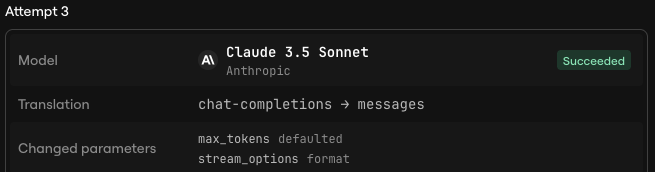
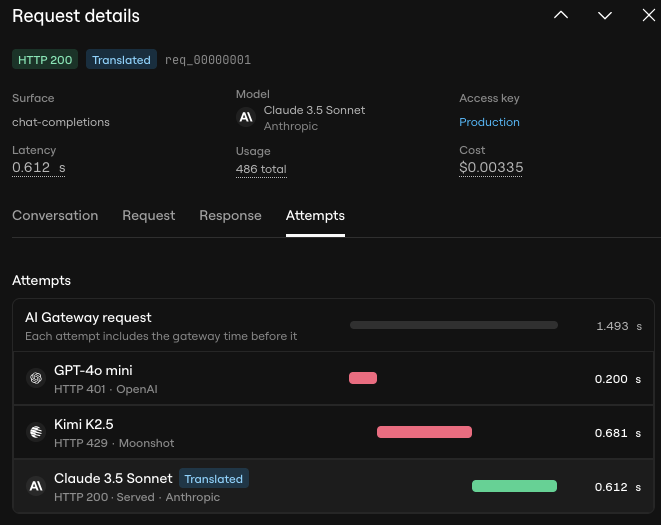
In this example, a chat completions request tried GPT-4o mini and Kimi K2.5 first. Both failed, so the gateway translated the request for Claude 3.5 Sonnet, which answered. The client still got a chat completions response.
## Where formats don't line up
API formats don't match feature for feature, so translation has limits. For the best fidelity with a model's features, call it from the SDK for its own format.
- A parameter the target format has no place for, such as `frequency_penalty` or `cache_control`, gets removed. The gateway lists each removed or changed parameter in the `Ngrok-AIG-Removed-Params` response header. Dropped cache markers can make a translated request cost more than a native one.
- Messages requires `max_tokens`. If you don't set one, the gateway sends the model's maximum output tokens, so set your own limit if lengths matter.
- Only text and images translate. A request with files, documents, audio, or video skips models that need translation.
- Requests that point at state a provider stores, such as `previous_response_id` in the Responses API, skip models that need translation. Send the whole conversation instead.
- If a [Firewall](https://ngrok.com/docs/ai-gateway/concepts/firewall) policy applies to the request, the gateway skips models that need translation.
If the gateway skips every model in a request, it returns `ERR_NGROK_27228` with the reason for each one. The [translation guide](https://ngrok.com/docs/ai-gateway/guides/use-any-model-with-any-sdk) lists every translated parameter, hosted tool, and skip rule.
## Get started
You need an ngrok account with AI Gateway credits. GPT-6.2 Sol bills to your ngrok credits, so you don't need an OpenAI account. This example sends an Anthropic Messages request from the Anthropic SDK for TypeScript.
[Create an ngrok account or sign in](https://app.ngrok.ai/), and check your balance under [**Credits**](https://app.ngrok.ai/billing). Create an [**access key**](https://app.ngrok.ai/keys) that allows `openai/gpt-6.2-sol`.
Follow the [**setup guide**](https://app.ngrok.ai/getting-started) and select **Anthropic** and **TypeScript**, or install the SDK and TypeScript runner yourself:
```bash
npm install @anthropic-ai/sdk && npm install --save-dev tsx
```
Save your ngrok access key in `.env.local`. Keep this file out of version control:
```dotenv
AI_GATEWAY_API_KEY=your_access_key_here
```
Use an ES module project (`"type": "module"` in `package.json`) for top-level `await`. Save this example as `index.ts`:
```typescript
import Anthropic from "@anthropic-ai/sdk";
const client = new Anthropic({
baseURL: "https://gateway.ngrok.ai",
apiKey: process.env.AI_GATEWAY_API_KEY,
});
const { data: message, response } = await client.messages
.create({
model: "openai/gpt-6.2-sol",
max_tokens: 1024,
messages: [{ role: "user", content: "Explain HTTP retries in two sentences." }],
})
.withResponse();
console.log("Served by:", response.headers.get("ngrok-aig-model"));
for (const block of message.content) {
if (block.type === "text") console.log(block.text);
}
console.log("Stop reason:", message.stop_reason);
```
Run the example from your project directory:
```bash
node --env-file=.env.local --import tsx index.ts
```
The first line names the OpenAI model that answered. The rest is a plain Messages response: a `text` block with the answer, and a stop reason such as `end_turn`, the same shape a Claude model returns. The wording varies between runs.
To compare against Claude, change `model` back to your Claude model and run it again. Nothing else changes.
Open [**Activity**](https://app.ngrok.ai/activity) and select the request. It shows the status, model, provider, token usage, and cost, plus a **Translated** badge. On the **Attempts** tab, the attempt's **Translation** row shows the format your SDK sent and the format the gateway used upstream. **Changed parameters** lists anything the gateway removed or adjusted on the way. In the fallback example above, the gateway filled in `max_tokens` because Messages requires it: